
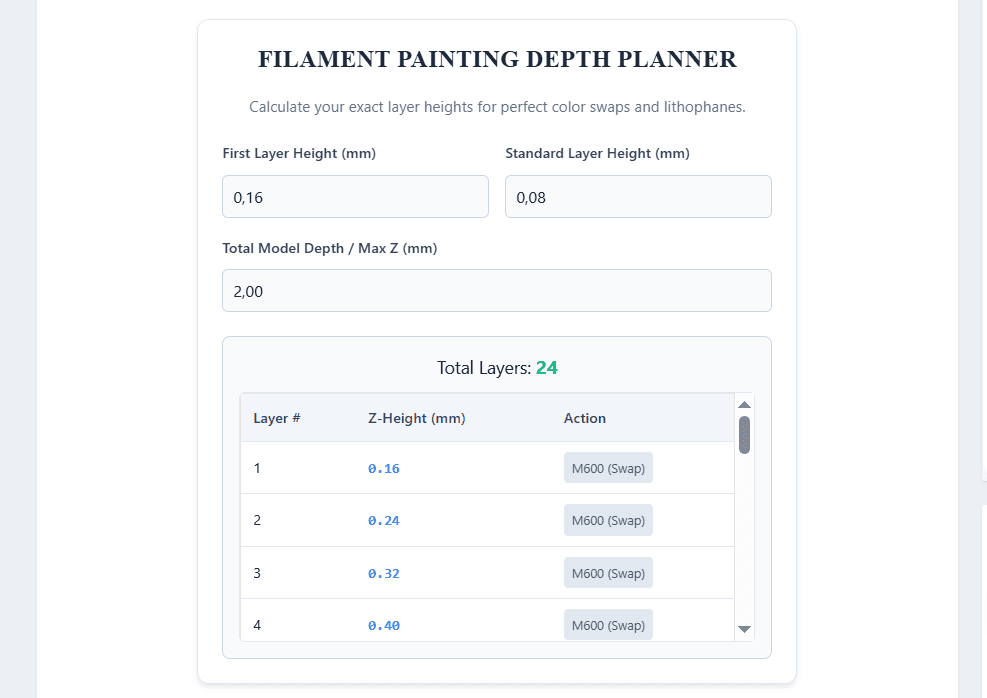
Filament Painting Layer Planner
Work out the exact Z height of every colour swap before you start the print.
| Layer | Z height | Action |
|---|---|---|
| 1 | 0.20 mm | M600 (swap) |
| 2 | 0.30 mm | M600 (swap) |
| 3 | 0.40 mm | M600 (swap) |
| 4 | 0.50 mm | M600 (swap) |
| 5 | 0.60 mm | M600 (swap) |
| 6 | 0.70 mm | M600 (swap) |
| 7 | 0.80 mm | M600 (swap) |
| 8 | 0.90 mm | M600 (swap) |
| 9 | 1.00 mm | M600 (swap) |
If you are diving into the world of 3D filament painting or creating backlit lithophanes, you already know that precision is everything. A single layer height miscalculation in Bambu Studio or PrusaSlicer can mix your colors incorrectly, ruining an 8-hour print.
Because filament painting relies on blending the Transmission Distance (TD) of different colored plastics at microscopic thicknesses, you need to know exactly at which Z-height to insert your M600 (Color Swap) commands.
Using the Layer Depth Planner
Our tool above makes manual slicing easier. Here is how to use it:
- First Layer Height: This is usually thicker to ensure good bed adhesion (commonly
0.16mm). - Standard Layer Height: For high-resolution filament painting, this is strictly kept at
0.08mm. - Max Depth: The total thickness of your 3D model (usually between
2.00mmand3.00mm).
Scroll through the generated table to find the exact Z-Height. When you are in your slicer's preview mode, drag the slider to match these exact numbers to add your color change safely.
The Problem with Manual Filament Painting
While our calculator above is great for manual planning, the traditional HueForge-style workflow can be incredibly tedious. To get a perfect print, you manually have to:
- Guess the color transmission depths.
- Calculate the layers.
- Manually slice the STL.
- Insert pauses and swaps on specific layers.
This manual trial-and-error often wastes expensive filament and time.
The Professional Solution: VoxelPrime
Why calculate layers manually when you can automate the entire process locally on your machine?
We developed VoxelPrime as an independent, professional desktop application specifically designed for 3D printing users who want flawless lithophanes and filament paintings without the cloud subscription fees.
VoxelPrime is the ultimate affordable HueForge competitor. It handles all the complex Transmission Distance math, auto-generates the mesh, and allows you to visualize the exact color blending before you ever turn on your 3D printer.
Stop guessing your layer heights. Upgrade your digital fabrication workflow and try VoxelPrime today to turn any 2D image into a stunning 3D printed masterpiece.