
1. What Is DepthGen Pro?
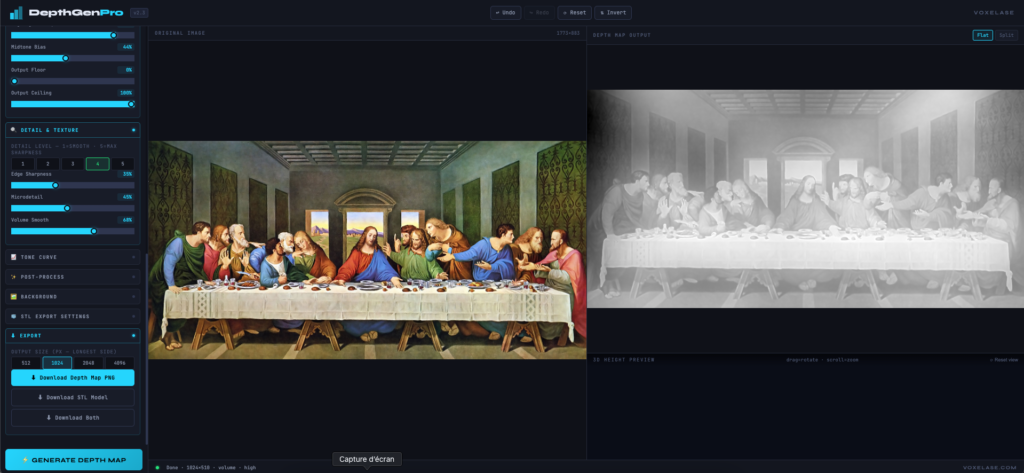
DepthGen Pro is a professional, fully offline desktop application that converts any 2D image into a precise grayscale depth map — the key ingredient for photorealistic CNC relief carving, 3D laser engraving, and STL model generation for 3D printing.
Unlike every major competitor on the market today, DepthGen Pro runs 100% on your computer with no internet connection, no cloud upload, and no subscription fees. You upload nothing. You share nothing. Your designs stay private.
Version 2.1, released by VOXELASE, is the most complete update to the tool since its original launch — rebuilt from the ground up with a professional-grade processing engine, a real-time WebGL 3D preview, and a redesigned interface that feels like professional CNC software.
And the best part? It costs just $5. That is not a monthly fee. That is not a per-image credit. That is a one-time payment for lifetime access to a tool that competes with software costing ten times as much per month.
2. Why Depth Maps Matter for CNC & Laser Engraving
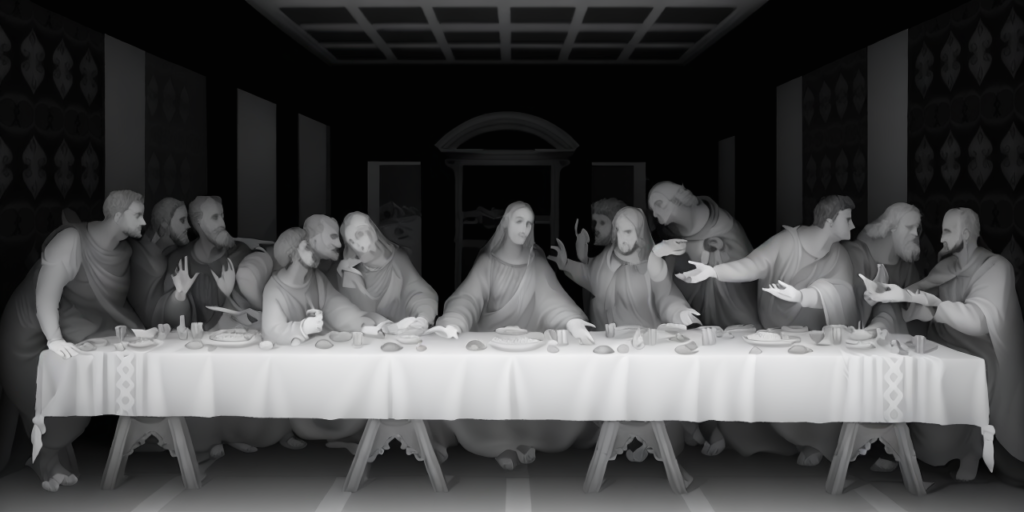
If you work with fiber lasers, CO2 lasers, or CNC routers, you already know that the quality of your depth map is everything. A depth map is a grayscale image where brightness represents elevation — white pixels represent the highest (most raised) areas of the material, and black pixels represent the deepest engraved areas.
Every CNC program — Vectric Aspire, VCarve, LightBurn’s 3D Sliced Mode, xTool Creative Space — reads this grayscale data to determine how deep to engrave each point on your material. A poorly generated depth map means:
- Flat, lifeless engravings with no 3D pop
- Crushed shadows that engrave too deep
- Blown highlights that lose surface detail
- Hours of manual editing in Photoshop to fix what the tool should have done correctly
DepthGen Pro was built specifically to solve every one of these problems, producing accurate, CNC-ready depth maps straight from any photograph or illustration — in seconds.
3. What’s New in DepthGen Pro v2.1
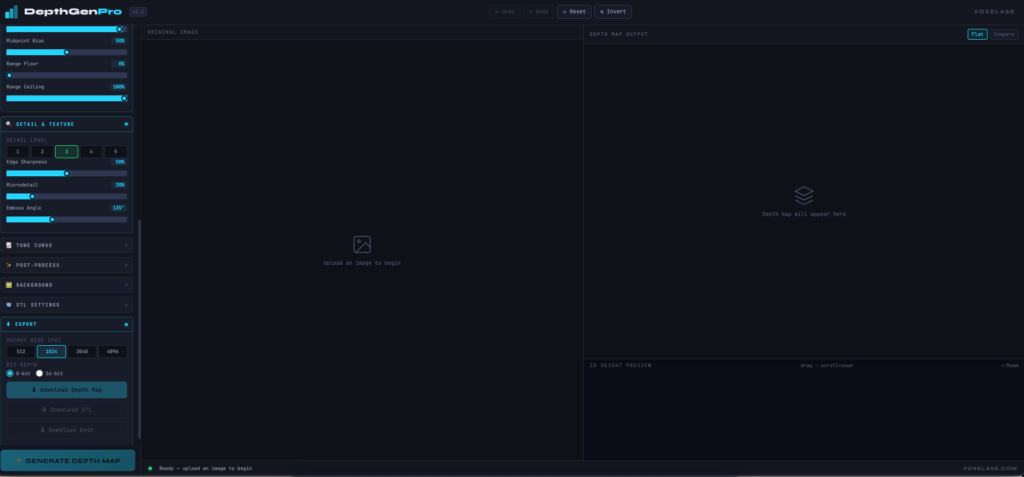
Version 2.3 is a complete architectural rebuild. Here is everything that changed:
Correct Depth Map Logic
Previous depth map tools — including DepthGen’s own earlier version — applied an incorrect luminance formula. v2.1 now uses the ITU-R BT.709 standard for perceptual luminance (0.2126R + 0.7152G + 0.0722B), which is the same formula used by professional color science tools. This means your depth maps are perceptually accurate — shadows and highlights land exactly where they should for engraving.
Working Real-Time 3D Preview
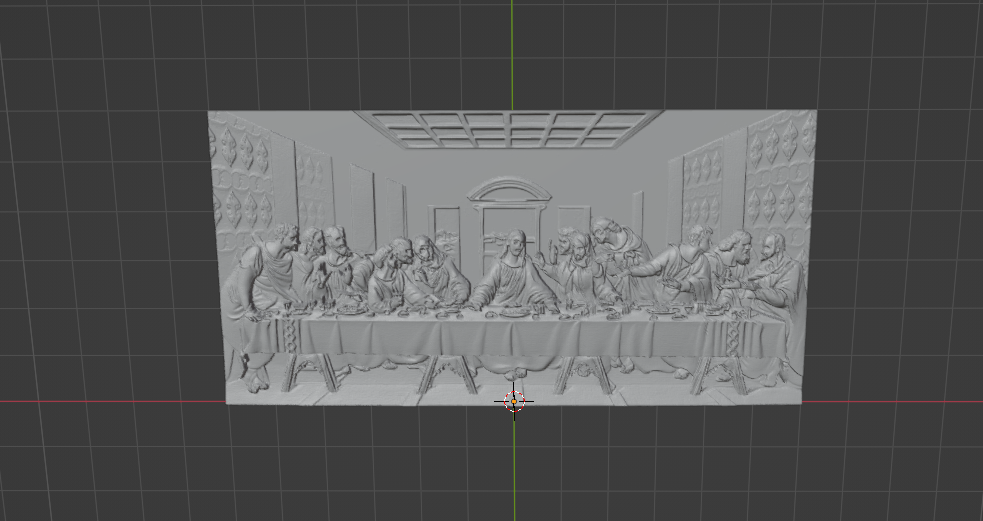
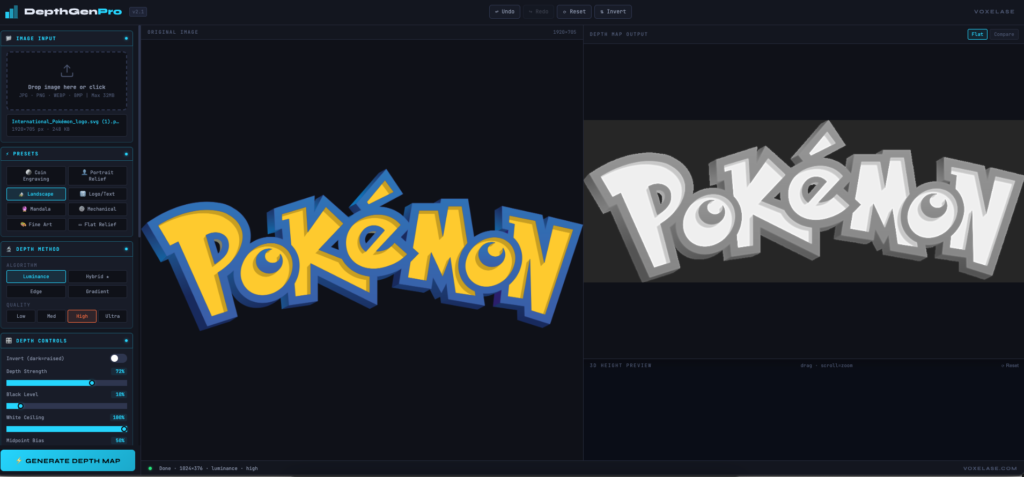
The 3D preview is now built on real WebGL shaders (vertex + fragment). You can rotate the 3D relief with mouse drag, zoom with the scroll wheel, and see exactly how your engraving will look in three dimensions before you cut a single pass. Colors transition from deep blue valleys to bright cyan peaks — matching the depth of the relief.
Fully Working Export System
All export functions now work reliably. PNG export uses the browser’s native canvas.toBlob() API for lossless output. STL export generates binary STL format — smaller and faster than ASCII — with properly computed vertex normals via cross product, a complete base plate, and sealed side walls. Your STL file is immediately printable in Bambu Studio, Cura, PrusaSlicer, and importable into Vectric and Aspire.
Zero Inline Event Handlers
Every control — sliders, toggles, buttons, dropdowns — is now wired via proper addEventListener calls inside a DOMContentLoaded listener. This eliminates the crashes and “function not defined” errors that affected earlier versions.
4. Full Feature Breakdown
Four Depth Estimation Algorithms
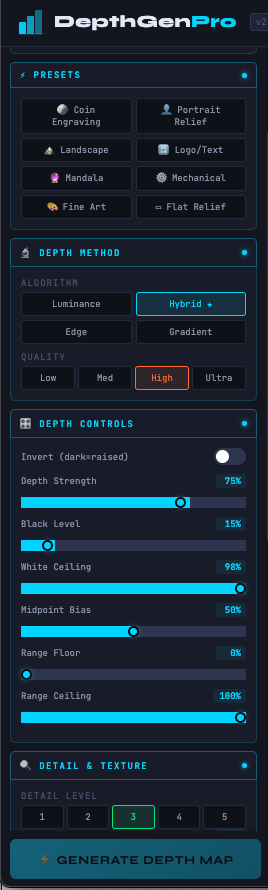
Luminance — Maps brightness directly to depth. White = raised, black = deep. Best for high-contrast illustrations and black-and-white photography.
Edge — Detects contours and edges using a Sobel operator and builds depth from line structure. Ideal for logos, mandalas, technical drawings, and geometric designs.
Hybrid (Recommended) — The most intelligent method. For each pixel, it computes local variance and dynamically decides whether to trust luminance or edge data. High-texture areas get edge emphasis; smooth areas stay photographic. Best general-purpose setting for portraits, landscapes, and mixed images.
Gradient — Integrates the horizontal and vertical gradients of the image to produce an extra-smooth, flowing depth surface. Best for portrait relief work where you want a natural 3D shape without sharp transitions.
Professional Depth Controls
Every parameter that matters for CNC and laser engraving is exposed as a precise slider:
- Depth Strength — Master control for relief intensity
- Black Level — Lifts the darkest pixels to prevent catastrophic over-engraving in shadow areas
- White Ceiling — Caps the brightest pixels to protect fine highlight detail
- Midpoint Bias — Shifts mid-tones toward shadows or highlights for artistic control
- Range Floor / Range Ceiling — Sets the exact output tonal range, giving full control over the physical depth of the engraving
- Invert — Toggles between raised and recessed relief — essential for negative engraving and wax seals
Tone Curve Editor
A fully interactive bezier tone curve with four draggable control points lets you fine-tune the relationship between input brightness and output depth with precision impossible on a simple slider. Built-in curve presets include Linear, S-Curve, High Contrast, Soft, and Inverse.
Detail and Texture Controls
- Detail Level 1–5 — Smoothest portrait finish to maximum mechanical sharpness
- Edge Sharpness — Boosted Sobel edge overlay for crisper line definition
- Microdetail — Unsharp mask-style high-frequency enhancement for fabric, stone, and skin texture
Post-Processing Pipeline
- Gaussian Blur — Controlled smoothing up to 15px radius
- Bilateral Denoise — Edge-preserving noise reduction that smooths flat areas without blurring depth edges
- Unsharp Mask Sharpen — Re-sharpens after blur for crisp edges
- Gamma, Contrast, Brightness — Full photographic control over the final depth map tone
- Vignette — Darkens the edges of the depth map — ideal for oval coin engravings
8 Professional Presets
Every preset is a fully tuned combination of algorithm, quality, and all slider values, designed by a professional with real CNC and laser engraving experience:
| Preset | Best For |
|---|---|
| Coin Engraving | Fiber laser coin and medal work |
| Portrait Relief | Smooth facial depth for bas-relief |
| Landscape | Natural terrain-like topography |
| Logo / Text | Maximum edge clarity for sharp text |
| Mandala | Intricate symmetrical pattern preservation |
| Mechanical | Gear and technical drawing precision |
| Fine Art | Painterly quality for artistic relief |
| Flat Relief | Shallow engraving on soft materials |
STL Export with Material Profiles
Export a fully closed, watertight STL model ready for your 3D printer or CNC CAM software. Control physical size in millimeters, minimum and maximum thickness, and base plate height. Switch between material profiles — Brass Coin, Wood Shallow, Wood Deep, Acrylic, PLA, and Resin — and all physical parameters adjust automatically.
Background Removal
Remove backgrounds automatically using a luminance threshold. Fill the removed area with white (raised surface), black (engraved deep), or 50% gray — whichever suits your workflow.
Quality Tiers
Choose from Low, Medium, High, and Ultra quality. Higher tiers apply progressively refined pre-processing to reduce noise before depth estimation, improving output at the cost of processing time.
Undo / Redo System
Full 25-step undo and redo stack. Every setting change, preset application, or curve adjustment can be reversed instantly with Ctrl+Z.
Keyboard Shortcuts
| Shortcut | Action |
|---|---|
| Ctrl+Z | Undo |
| Ctrl+Y | Redo |
| Ctrl+S | Quick save PNG |
| Ctrl+O | Open image |
| I | Toggle invert depth |
5. DepthGen Pro vs. Competitors — Honest Comparison
| Feature | DepthGen Pro v2.1 | DepthR | SculptOK | ArtificialStudio |
|---|---|---|---|---|
| Price | $3 one-time | Subscription | Credits | Free (limited) |
| Works Offline | ✅ 100% | ❌ Cloud only | ❌ Cloud only | ❌ Cloud only |
| No Data Upload | ✅ | ❌ | ❌ | ❌ |
| Watermark-Free | ✅ | ❌ (paid tier) | ❌ | ✅ |
| STL Export | ✅ Watertight | ✅ | ❌ | ❌ |
| 3D Live Preview | ✅ WebGL | ✅ | ✅ | ❌ |
| Tone Curve Editor | ✅ Bezier | ❌ | ❌ | ❌ |
| Depth Algorithms | ✅ 4 methods | 1 (AI) | 1 (AI) | 1 (AI) |
| 8 Pro Presets | ✅ | ❌ | ❌ | ❌ |
| Bilateral Denoise | ✅ | ✅ | ❌ | ❌ |
| Background Remove | ✅ | ✅ | ✅ | ❌ |
| Undo / Redo Stack | ✅ 25 steps | ❌ | ❌ | ❌ |
| Black Level Control | ✅ | ✅ | ❌ | ❌ |
| Material Profiles | ✅ 6 profiles | ❌ | ❌ | ❌ |
| Privacy | ✅ Total | ❌ | ❌ | ❌ |
The conclusion is clear. DepthGen Pro is the only tool in this category that combines offline privacy, professional-grade controls, and STL export — at a price that is genuinely accessible to every maker, hobbyist, and professional in the world.
6. Who Is DepthGen Pro Built For?
Fiber Laser Engravers — Create photorealistic coin designs, portrait engravings on metal, and custom medal reliefs. DepthGen Pro outputs exactly the grayscale file LightBurn’s 3D Sliced Mode needs.
CO2 Laser Users — Engrave portraits on wood, leather, and slate with dimensional depth that makes flat engravings look like sculptures.
CNC Router Operators — Generate height maps for Vectric Aspire and VCarve, then export STL files that import directly into your CAM workflow.
3D Printing Enthusiasts — Generate lithophane-style STL models from photographs. Control every dimension to match your printer’s capabilities.
Bas-Relief Artists and Sculptors — Use depth maps as reference guides for hand carving or as input to CNC for producing precise relief artwork.
Etsy Sellers and Small Business Owners — Turn any client photo into a ready-to-engrave depth map in minutes. No monthly software fees eating into your margins.
7. Supported Workflows and Compatible Software
DepthGen Pro outputs standard PNG and binary STL files compatible with every major tool in the CNC and laser engraving ecosystem:
Laser Software: LightBurn (3D Sliced Mode), xTool Creative Space, EZCAD, RDWorks
CNC CAM: Vectric Aspire, VCarve Pro, Fusion 360, ArtCAM
3D Printing Slicers: Bambu Studio, PrusaSlicer, Cura, Chitubox
Image Editing: Adobe Photoshop, GIMP, Affinity Photo
The exported depth map follows the universal convention: white = raised, black = deepest — compatible with every tool listed above without any additional conversion or inversion.
8. How to Use DepthGen Pro — Step by Step
Step 1: Load Your Image
Drag and drop any JPG, PNG, WEBP, or BMP file onto the app — up to 32MB. You can also paste directly from your clipboard with Ctrl+V.
Step 2: Choose a Preset
Select the preset that matches your project type. For a portrait on a brass coin, choose Coin Engraving. For a landscape CNC carving, choose Landscape. The preset instantly configures every setting optimally.
Step 3: Select Your Depth Method
Leave it on Hybrid for most images. Switch to Edge for logos and mechanical drawings, or Gradient for smooth portrait work.
Step 4: Fine-Tune the Controls
Adjust Depth Strength, Black Level, and White Ceiling to match your material’s physical depth range. Watch the output update in real time.
Step 5: Review the 3D Preview
Rotate the 3D model to inspect the relief from every angle. This is your virtual proof before cutting any material.
Step 6: Export
Click Download Depth Map for a lossless PNG ready for LightBurn or Vectric. Click Download STL for a 3D-printable model. Both files download instantly to your computer.
Total time from image to finished depth map: under 60 seconds.
9. Pricing — Why $5 Changes Everything
Let’s be honest about what the competition charges.
DepthR charges a monthly subscription for full access. SculptOK requires paid credits that disappear after use. AI-based tools online demand cloud access, upload your images to their servers, and apply watermarks on the free tier.
DepthGen Pro costs $5. One time. Forever.
No monthly bill. No credit system. No subscription that renews while you are on vacation. No watermark on your output. No limit on the number of images you process. No internet connection required.
For the price of a coffee, you get a professional tool that does more than tools costing $20 per month. This is the VOXELASE philosophy — professional-grade tools should be accessible to every maker on the planet, not just those with large software budgets.
10. Frequently Asked Questions
Does DepthGen Pro require an internet connection?
No. The application runs entirely on your computer. No data is uploaded, transmitted, or processed on any server. Your images remain 100% private.
What image formats are supported?
JPG, PNG, WEBP, BMP up to 32MB. The app automatically resizes images larger than your selected output size.
What output sizes are available?
512px, 1024px, 2048px, and 4096px square maximum dimension. Aspect ratio is always preserved.
Is the STL export compatible with Bambu Studio and PrusaSlicer?
Yes. The STL output is binary format with a full base plate and sealed side walls — watertight and immediately sliceable in any modern slicer.
Can I use DepthGen Pro for commercial work?
Yes. There are no restrictions on commercial use. Process client images, sell the results, and keep 100% of your revenue.
Does it work on Mac and Linux?
The web version works in any modern browser on any operating system. The Windows .exe version is a standalone desktop app.
Is the $3 a subscription or one-time?
One-time purchase. Lifetime access. No renewals.
What is the difference between 8-bit and 16-bit export?
8-bit PNG exports 256 depth levels — sufficient for most laser and CNC work. 16-bit exports 65,536 depth levels — maximum precision for demanding CNC relief projects requiring sub-millimeter accuracy.
11. Download DepthGen Pro v2.1
DepthGen Pro v2.3 is available now on VOXELASE.COM for a one-time payment of $5.
What you get:
- DepthGen Pro v2.3 Windows .exe (standalone, no install required)
- Lifetime updates for the v2.x series
- Access to all 8 presets, 4 depth algorithms, tone curve editor, STL export, and 3D preview
- Free technical support via the VOXELASE community
For The 3d setting and view : 3D Lithophane Generator