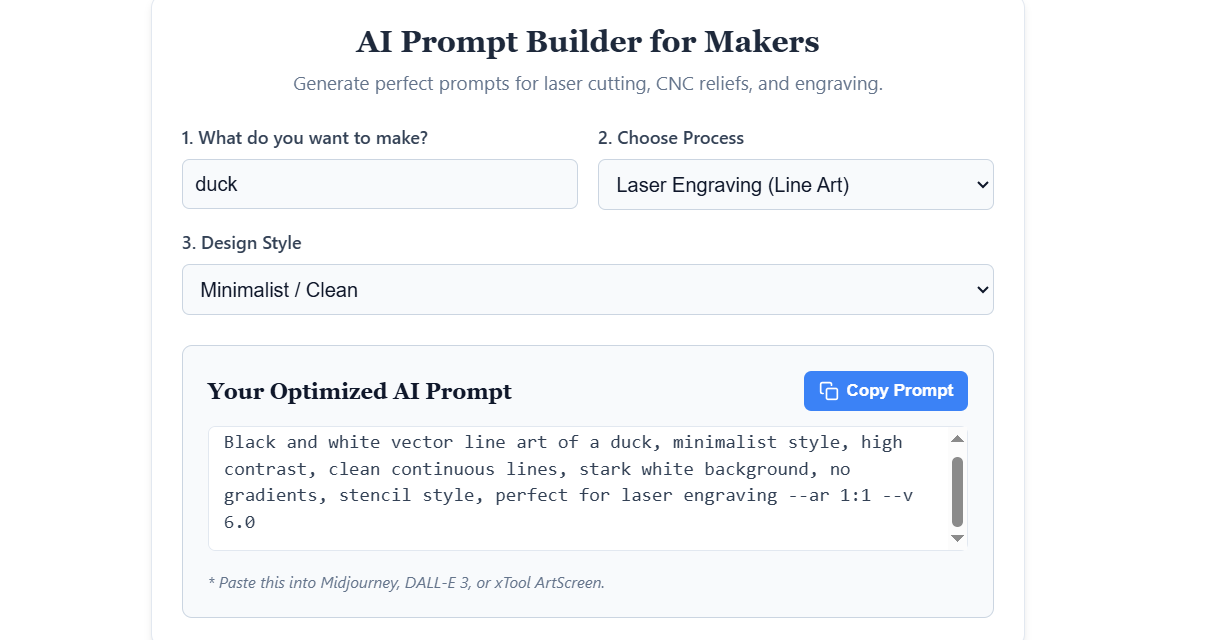
AI Prompt Builder for Makers
Generate perfect prompts for laser cutting, CNC reliefs, and engraving.
Your Optimized AI Prompt
Why Most AI Images Fail in Digital Fabrication (And How to Fix It)
Generating a stunning image with Midjourney or DALL-E is easy. But sending that standard image directly to your laser cutter or CNC router usually results in a messy, charred piece of wood or a failed carve.
AI models are trained to create visually appealing art with dynamic lighting, realistic shadows, and complex gradients. However, digital fabrication machines don’t see “art”—they see data, vectors, and coordinates. To bridge the gap between AI generation and physical manufacturing, you need to understand how your machines interpret images.
The Golden Rule of Laser Cutting: Avoid Shading
If you are generating an image for a laser cutter (especially for cutting out shapes or vector line engraving), shading is your biggest enemy.
A laser cutter operates optimally on binary data: the laser is either ON (cutting) or OFF (not cutting). When you feed a laser software an image with soft shadows, gradients, or glowing effects, the software tries to interpret those gray areas. This often results in jagged edges, incomplete cuts, or an overly burned surface because the software is guessing where the lines actually end.
The Solution: Use our AI Prompt Builder above and select the Laser Cutting or Laser Engraving options. These prompts are engineered with specific keywords like “stark white background,” “no gradients,” and “continuous clean lines” to force the AI to produce pure, high-contrast vector-style graphics that your laser software (like LightBurn) can trace perfectly with zero cleanup required.
What is a True Depth Map? (Hint: It’s Not Just a Black & White Image)
When moving from 2.5D laser engraving to full 3D CNC routing or 3D printing reliefs, you need a Depth Map (or Height Map). This is where many makers get stuck.
A common misconception is that you can just take any AI-generated image, turn it black and white, and use it for CNC carving. This is completely wrong. A standard desaturated image still contains lighting and shadows. If a character has a dark shirt but is standing in the foreground, the CNC machine will interpret the dark shirt as a deep hole, carving it away despite the character being in the front.
A true mathematical depth map is a specialized 3D representation where brightness strictly equals Z-axis height:
- Pure White: The highest point of the model.
- Pure Black: The lowest point (background).
- Grayscale Values: Precise mathematical steps between the highest and lowest points.
While our prompt generator helps AI models understand this concept, AI is notoriously inconsistent at rendering mathematically perfect height data. For professional results, makers often take high-contrast AI base images and process them through dedicated local desktop utilities—like DepthGen Pro v3—to calculate real depth map algorithms and utilize GPU-accelerated processing for flawless CNC reliefs.
Perfecting Images for 3D Filament Painting
If you are using AI to generate art for multi-color 3D printing (Filament Painting), contrast and clear color boundaries are crucial. Whether you are slicing layers in Bambu Studio or using professional local applications like VoxelPrime, starting with an image that has distinct color separation rather than muddy AI gradients will result in a much cleaner, more vibrant physical print.
Ready to make something? Scroll back up to the AI Prompt Builder, type in your idea, and generate the perfect prompt to start your next fabrication project!